RLV Wardrobe HUD  ·  Second Life

Your clothes,
your rules.

Subbi Clothes is a complete management and automation system for your Second Life wardrobe. Swap avatars, manage outfits, control who can interact — with animations, sounds, and particles on every change. Works with any body, any avatar.

Requires a viewer with RLVa support (e.g. Firestorm 7.2+) and RLV enabled.

Immersion

Animations, sounds, and particle effects on every outfit change make your SL experience more alive.

Interactivity

Let others play with your wardrobe — avatars, dressing, undressing, hairstyles. Especially for couples.

Privacy & Management

Choose by category exactly what each person can do — public, friends, group, or individual level.

Security

PG-Safe+ dresses your avatar, revokes permissions, or replaces your look in restricted regions or AFK.

What you get

One HUD, complete control

Clothing management

Swap individual body part clothing states instantly. Go from dressed to underwear to undressed — per layer, per part, or all at once.

Avatar & outfit swap

Group your avatars and outfits, switch between them instantly. Random pick, mix body and clothes from different avatars, share access.

Accessories system

Attach and detach items individually. Auto-detect folders, subfolders, auto-detach on outfit change — organize your objects freely.

Access control

Whitelist and Blacklist, group access, minimum interaction distance, and per-category permissions for every HUD function.

Full customization

Message style, color, gender profiles, clothing names, notification preferences — everything configurable and saved per avatar.

Any body, any avatar

Works with any mesh body, any avatar type, any clothing — including BOM layers. Copy · Mod · Transfer.
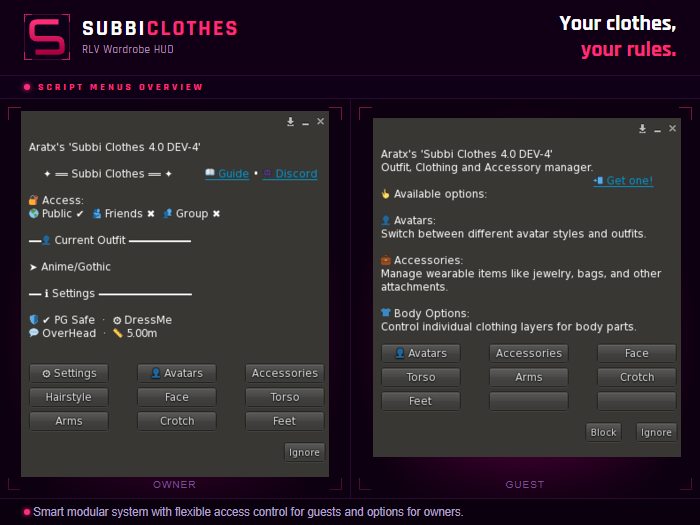
Subbi Clothes HUD — main menu showing owner and guest views
Main interface — owner & guest view
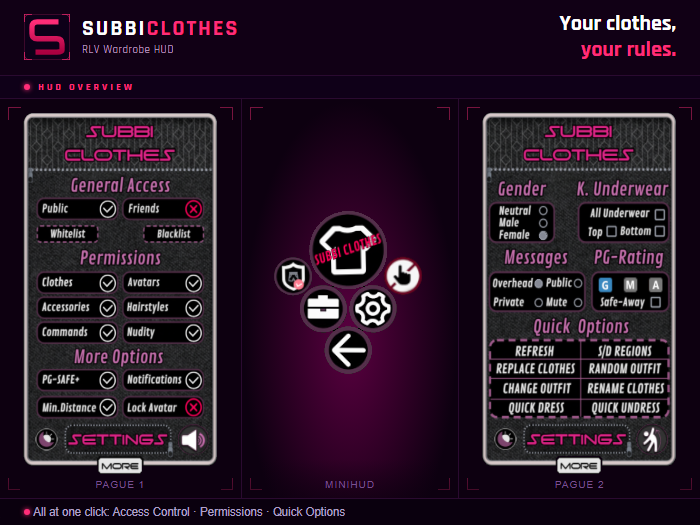
Subbi Clothes HUD — settings panel with permissions and access control
Settings — permissions & access control

Quick start

Up and running in 4 steps

1

Get the HUD

Buy on the Marketplace. Copy · Mod · Transfer.

Marketplace
2

Create your folders

Run SAF v3 — it builds your entire inventory structure automatically.

3

Add your clothes

Upload your avatars and outfits to the RLV folder (Firestorm recommended).

4

Configure

Use the Config Editor to set up animations, colors, and permissions.

Open editor

Step 2 — Creating folders with SAF

Step 3 — Uploading your avatar

Who is it for?

Built for every style of play

Couples & Social

Let a partner control your wardrobe, swap your avatar, or undress you — with full permission control over exactly what they can and can't do.

Roleplay & Immersion

Wear animations, sounds, and particles on every clothing change. PG-Safe+ protects you automatically in restricted areas or when AFK.

Events & DJs

DJ Regions auto-adjusts your look when entering event venues. Quick Dress and Quick Undress for fast scene or stage changes.

Wardrobe Management

Dozens of avatars and outfits? Subbi Clothes groups, organizes, and switches them without leaving Second Life or opening a single folder.

In the box

Everything you need,
out of the box.

No extra purchases, no separate tools to hunt down. The HUD package includes everything required to get started.

Get it on Marketplace

Free tools

Made to make your life easier

Outfit Config Editor

Visual Config Editor

Configure your outfits visually — body parts, wear animations, timing, particles, permissions, and colors. Export a ready-to-paste config notecard without touching JSON by hand.

  • All body parts & animation settings
  • Color pickers with gradient & presets
  • Import existing notecards
  • English & Spanish interface
Open Config Editor
Outfit Config Editor
In-world tool · Included with HUD

Semi-Automatic Folders Creator v3

Sets up your entire Subbi Clothes folder structure directly inside your Second Life inventory — automatically. What used to take hours of manual work is done in minutes. Included in the HUD package.

FAQ

Common questions

Does it work with my body / avatar?

Yes. Subbi Clothes works with any mesh body, any avatar type, and any clothing — including BOM layers and alpha fixes. It is not locked to any specific body brand or system.

Is RLV required?

Yes. Subbi Clothes is an RLV HUD and requires a viewer with RLVa support — Firestorm 7.2 or higher is strongly recommended. You also need to have RLV enabled in your viewer settings.

Do I need scripting knowledge?

No. SAF v3 creates all the folders automatically. The Outfit Config Editor handles configuration visually. The initial setup takes 10–15 minutes following the guide.

Can others interact with my HUD?

Yes, and you have full control. You choose per category (clothes, avatars, accessories, hairstyle, nudity…) what each person — public, friends, group, or individual whitelist — can do.

Where do I get help?

Message Souwind or Aratx in Second Life. Personal support and constant updates are included.

What version is current?

The latest public release is v3.3D. A new major version (4.0 DEV) is currently in active development. Owners can request redelivery via /55 redelivery in-world.